Connect a Docker host
Connect a Remote Agent to collect logs and metrics from your host.
LogForge · Runs in your infrastructure
Before you begin
A Remote Agent collects logs and container metrics for your LogForge server. ECHO in generated filenames means this agent; keep those filenames unchanged.
- Ready: a reachable LogForge server and a prepared Docker host.
- Access: the local Owner or permission to connect agents; Docker access and
sudoon the target Linux host. - Tools: Bash and Docker Engine. Compose bundles also need Compose 2.24.4 or newer. Check
docker versionand, for a Compose bundle,docker compose versionon that host first.
Keep the bundle private. It contains a short-lived, one-time registration credential. Exclude it from screenshots, tickets, shell history and source control.
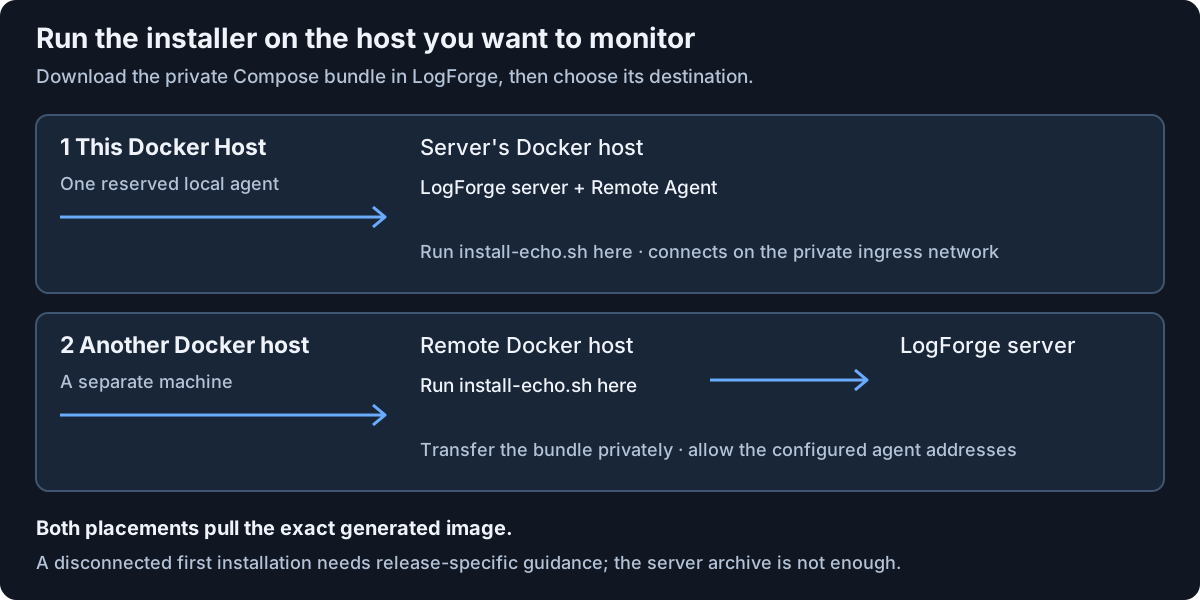
Choose where the agent runs
| Placement | Where you run the installer | How it connects |
|---|---|---|
| This Docker Host | The server's own Docker host | The server's private ingress network |
| Another Docker host | The separate host you want to monitor | Your configured agent HTTPS and mutual TLS addresses |
Local placement has one reserved slot. If an unfinished registration already occupies it, inspect that identity before trying again.
For a separate host, confirm its DNS and routing reach both agent addresses. Browser access from your laptop does not check that path.
Generate and download the installation bundle
Older August installations: these offer Copy command with a Docker Run command. Their local placement is labeled
This Unicron Docker host, meaning the server's own host. Follow steps 1–4 below, copy the complete one-time command, and run it unchanged in Bash on the selected host. Skip bundle download and extraction. The Compose instructions apply when Download Docker Compose bundle is offered; use one method for each agent.
In LogForge:
- Open Overview > Hosts > Add remote agent.
- Choose Install target: Docker host, then the placement above.
- Review Remote Agent display name, Docker host environment, and the displayed server addresses. Local placement manages its identity automatically.
- Review the action reason and choose Create Docker install artifact. An artifact is simply the generated installation files for this agent.
- Choose Download Docker Compose bundle.
- Transfer
unicron-echo-docker-host-compose-bundle.tarprivately to the intended host. For local placement, use the server's Docker host.
For Compose bundles, download before copying the command. That command needs its companion files.
Install on the selected host
In Bash, from the private directory containing that downloaded bundle, use Copy command in the wizard. Its current steps are:
tar -xf unicron-echo-docker-host-compose-bundle.tar
cd unicron-echo-docker-host
bash ./install-echo.sh
Run the generated steps unchanged. Keep all extracted companion files together. The installer checks placement, permissions, state, the exact CPU-compatible image and health before finishing.
Check: installation succeeds and LogForge shows the connected agent with current inventory. Container startup alone does not establish a successful connection. Once connected, remove temporary transfer copies of the one-time bundle; preserve the installed files and agent state.
Image access and offline limits
- For Compose bundles, both placements need access to pull the exact generated image. The installer runs Compose pull; a preloaded image alone does not replace that requirement.
- A fully disconnected first agent installation needs a release-approved procedure. The server's offline archive does not provide that procedure automatically.
- If Docker uses a custom data root, obtain matching release guidance before generating the bundle. Exporting a log-path variable in your shell does not override the new installer; do not hand-edit its generated settings.
Host loopback port 24224 must be free. It receives forwarded application logs. Do not expose it to neighboring machines; Docker Engine older than 28 also needs host firewall protection.
Check or recover the existing agent
For a Compose bundle, from its extracted directory, use the generated diagnostics command. Read the output privately and redact it before sharing:
bash ./troubleshoot-echo.sh
For an older Docker Run installation, replace CONTAINER_NAME in docker logs CONTAINER_NAME with the name from its generated command. Follow that installed release's recovery controls; do not rerun its one-time registration command as a restart.
For a failed health wait, preserve the container and state and inspect Settings > Remote Agent deployments. Use the offered same-identity recovery for that recorded installation. Container names are generated per identity; do not substitute a fixed example name or repeat the one-time installer as a restart.
For version changes and one-time updater connection, see Updates and recovery. Next, monitor your first workload.
For native Linux server access, follow Set up host Terminal and Files after the agent and its supported release are ready.